Decklink SDI input
Onlyview usage
Onlyview can use Decklink acquisition cards to input SDI signal, and use it as a live media.
Media List
The basic usage is to click on the Add Decklink Media button:

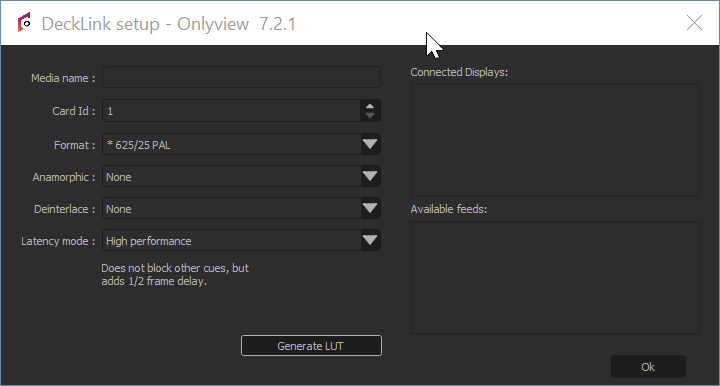
Media name: A name that is meaningful to you.
Card Id 🆔: The media Card Id. It is the same for all Media Servers. Without a patch, it is the row number in Blackmagic Desktop Video Setup, starting at 1. To find which Card Id receives a signal, see Decklink setup.
Source: Depending on the model, Decklink cards can input SDI only, or HDMI, Optical SDI...
Format: This is needed to initialize the cue's dimensions, and to check that the input signal corresponds to the required format. A quad link signal (for instance 8K) needs a specific connector mapping: see Decklink setup.
Anamorphic: The cue can be rescaled vertically to take anamorphic scaling into account.
Latency mode:
-
High performance: This is the default. When rendering the frame, Media Server just draws whatever image arrived last.
-
Low latency: Media Server waits a few milliseconds until a new image arrives. The advantage is less latency; the drawback is that frames take longer to render. And if you are not genlocked, the frame duration will vary at each reboot. You can monitor the frame duration using the CPU mire.
Card patching per Media Server
The Card ID is also impacted by DisplaySetup. The same setting is available in Producer: Edit Media Server window, "DisplaySetup" tab.
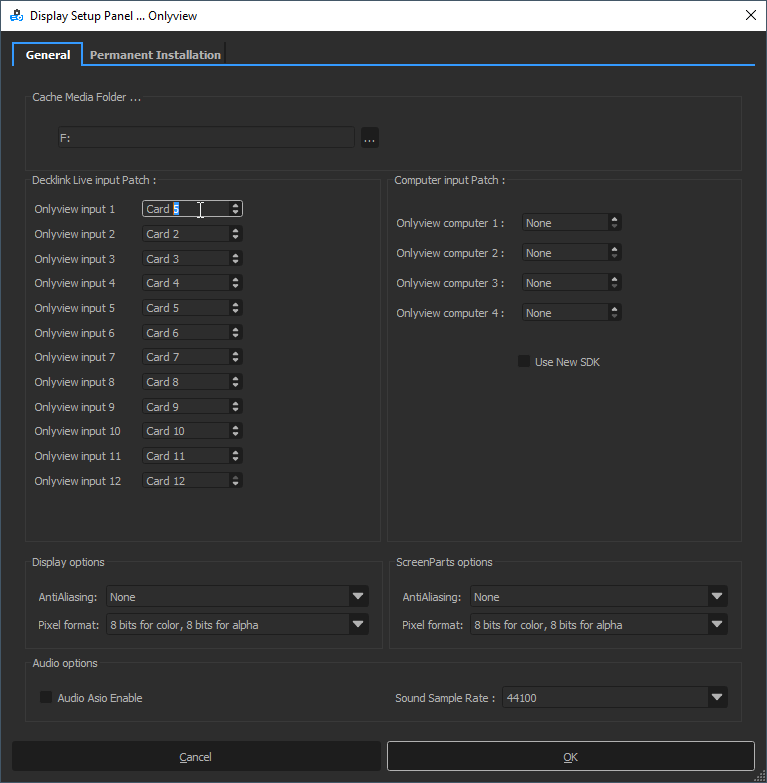
The order of the Cards depends on the PCIe slots, and on the card models. So on two Media Servers, the same Card Id can point to different connectors. The "Decklink Live input Patch" corrects this for a specific Media Server.
| In the patch window | Meaning |
|---|---|
| "Onlyview input N" | Row for the media Card Id 🆔 N |
| "Card M" | Server Card Id M: the Card used on this Media Server |
In the screenshots above, the media Card Id 🆔 is set to 1. On this Media Server, "Onlyview input 1" changes it to the server Card Id 5.
By default, "Onlyview input N" is set to "Card N": nothing changes.
With "None", the media with this Card Id does not play on this Media Server.
The "Available feeds" list in the media setup window shows the result of the patch: see Decklink setup.
This patch applies to inputs only. Decklink outputs have no patch: see Decklink setup.
See also
Decklink cards can also be used the other way around, to output the stage — see Decklink output.