TouchEngine
Onlyview usage
Onlyview can play a TouchDesigner project (.tox file) as generative real-time content,
using the TouchEngine runtime.
*TouchDesigner or TouchPlayer must be installed on the servers and on Producer
Licensing
You need a dedicated license to play the content in Onlyview : TouchDesigner or TouchPlayer licenses (Educational, Commercial, or Pro ; see TouchDesigner Licensing page for details on how to install licences)
Producer needs one to be able to open the .tox and list its parameters
(and optionally, render it in the preview).
Each MediaServer also needs its own playback license. Unlike Onlyview, which uses a single CodeMeter dongle on Producer, TouchEngine needs a dongle on each server.
Media List
To add a TouchEngine media, drag & drop a .tox file into the media list, or use the
Add Media button. The setup dialog opens on first add, and can be reopened later via the
media setup button.
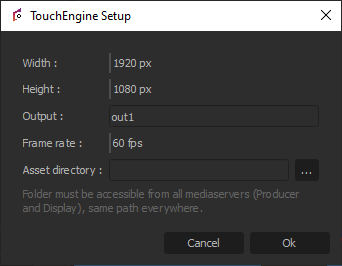
Width / Height: The size of the output texture, in pixels. This must match the
output resolution defined in the .tox file, otherwise the image will be cropped or
incorrectly sized.
Output: The TouchDesigner operator path whose texture will be used as the media output.
Defaults to op/out1. This must match the name of a TOP operator exposed in your .tox
project.
Frame rate: How many times per second TouchEngine cooks the .tox. Typically set to match
your display frame rate. Lower values reduce CPU and GPU load at the cost of animation
smoothness. Values above the display frame rate have no effect: Onlyview cannot provide clock
ticks faster than its own render rate.
Asset directory: Folder used to resolve relative file paths referenced inside the .tox
(see Saving below). Must exist, at the same path, on every Media Server (Producer
and Display). Leave empty if the .tox has no external file references (e.g. all assets are
embedded).
Limitations
- TouchEngine initialization takes 10–15 seconds; an animated placeholder is shown while loading.
- A paid TouchEngine license is required on Producer and on every Media Server.
- Only supported on Windows.
.toxmedia will not render on Linux Media Servers. - Only one output texture per
.toxfile is supported.
ActionGraph
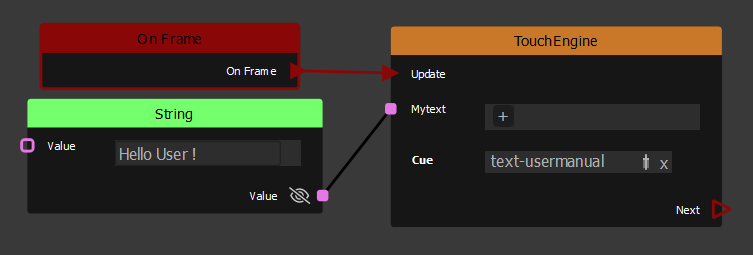
To drive the exposed parameters of the .tox at runtime, use the TouchEngine node in
the ActionGraph. The TouchEngine node's Update event input
must be connected to an OnFrame event so that parameters are sent every frame.
Texture inputs are also supported: connect a TextureArea to a texture-type parameter
to feed it into the .tox.
Updating a .tox file
Editing a .tox file on disk while Producer is running does not update anything by
itself. This is the same for every media type, not specific to TouchEngine.
To apply the change:
- Use Refresh Media (media list) so Producer re-reads the file. This updates the exposed parameters shown in the ActionGraph.
- Go Online again (Ctrl-O) so every Media Server reloads the new content.
Both steps are needed. Refreshing alone only updates Producer's own copy.
Creating a .tox file in TouchDesigner
Creating a component
Create a Base COMP to contain your content. The final rendered image must be connected to the component's output.
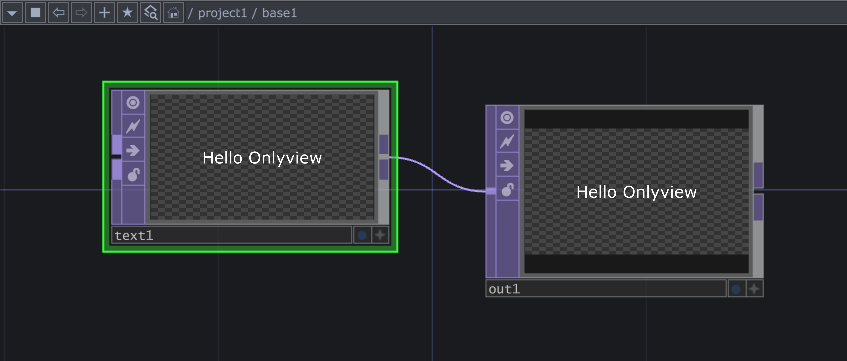
Texture output
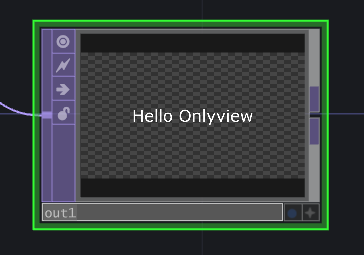
The output TOP name must match the Output name configured in Onlyview (default: out1).
Exposing parameters
Parameters exposed on the component surface can be driven at runtime from Onlyview's ActionGraph using the TouchEngine node.
Right-click the Base COMP → Customize Component.
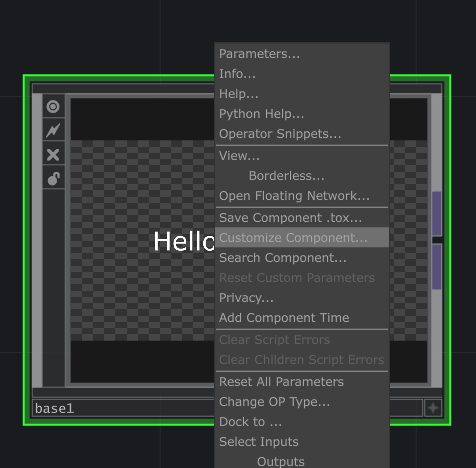
In the Component Editor, create a parameter page and add the desired parameters.
Supported types: Bool, Int, Float, String, Vec2, Vec3.
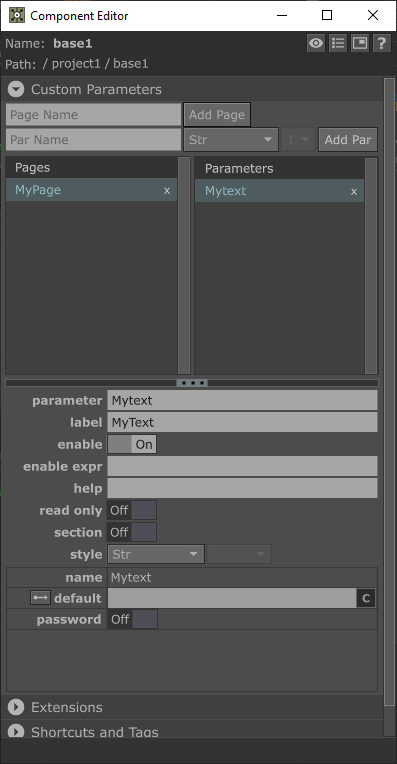
Adding a new parameter before an existing one is safe: the existing one keeps its ActionGraph connection and value, at its new position. Renaming an existing parameter is not safe: it is treated as a new parameter, and any existing connection or value on the old one is lost.
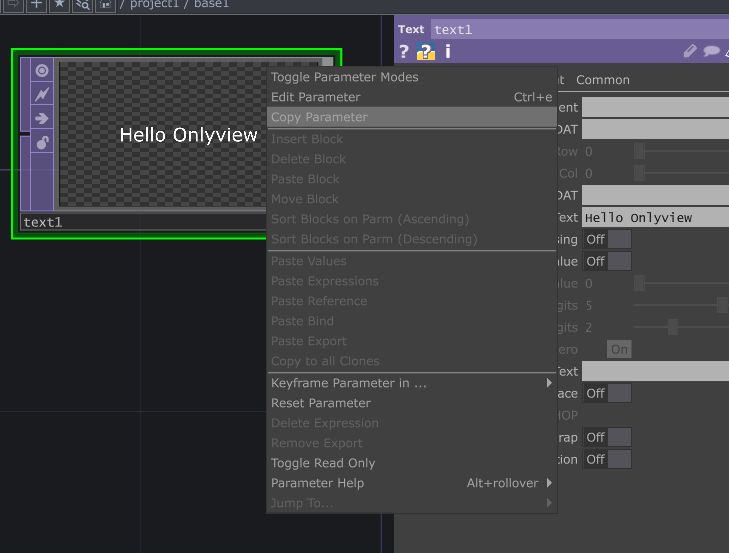
To bind an exposed parameter to an internal operator parameter, go inside the component, right-click the target parameter → Copy Parameter.
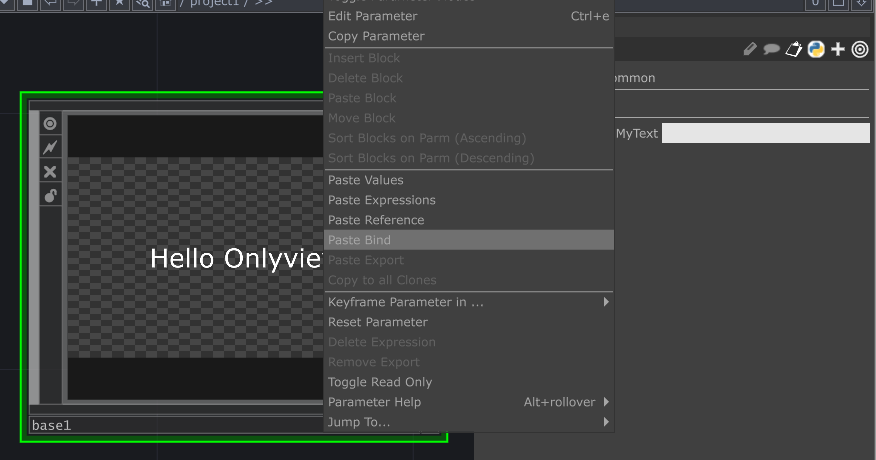
Then right-click the corresponding exposed parameter on the component surface → Paste Bind.
/local/time
Onlyview feeds the cue's current time (in seconds, relative to cue start) into the
standard /local/time parameter. No binding is needed — it is always available and
allows the Onlyview timeline to drive time-based content directly.
Saving
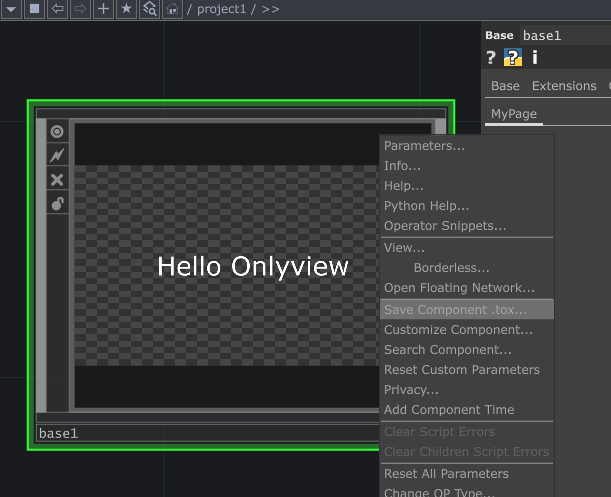
Right-click the Base COMP → Save Component .tox.
The .tox can reference file assets (textures, movies, etc.) two ways:
- Embedded: TouchDesigner saves the file content inside the
.tox, using its Virtual File System. Self-contained, synced by Onlyview like any other media. - External path: the
.toxonly stores a file path. Not synced by Onlyview. The file must exist at that same path on every Media Server. Point Asset directory (above) to a shared folder so these paths resolve there.
ActionGraph
Once the media used in an Onlyview cue, the ActionGraph Controller represents .tox file parameters
as node inputs.