Followspot
Followspot
A followspot is a fixture that continuously aims at a performer on stage. Traditionally, an operator rides the fixture and steers it manually. The Followspot nodes replace that operator: they receive real-time performer positions from a tracking system and automatically compute the pan, tilt, intensity, and zoom values needed to keep each fixture pointed at the right target, then transmit those values as DMX.
Typical use: a corporate event where a speaker moves freely on stage without a dedicated followspot operator. Onlyview tracks the speaker and drives the fixtures automatically so they remain correctly lit at all times.
The followspot nodes form a pipeline that takes tracking data from a tracking system and drives physical followspot fixtures via DMX:
Trackings → Followspot From Tracking → Followspot Tuner → Followspot DMX Send
- Trackings carries the live positions of performers on stage (e.g. from a TUIO Input node).
- Followspot From Tracking assigns a performer to follow and outputs aim direction and intensity per spot.
- Followspot Tuner corrects for fixture-specific pan/tilt orientation and applies calibration offsets.
- Followspot DMX Send converts the corrected values to DMX channel values and sends them to the fixture.
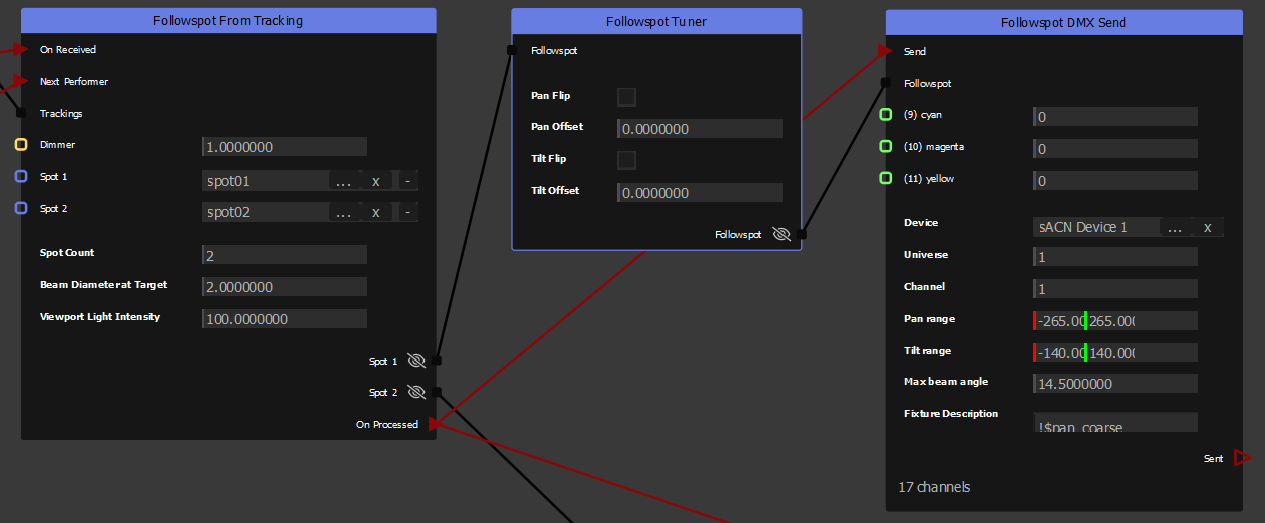
Followspot From Tracking
Assigns all spots to a single tracked performer and computes the aim direction and beam angle for each fixture.
All spots aim at the same performer at a time. When a performer is assigned, intensity fades in; when they leave tracking, it fades out. On every performer change — whether triggered manually or automatically — the node fades the beam out, waits while the fixture silently slews to the new target, then fades back in.
Automatic advance: if the current performer disappears from tracking and other performers are present, the node advances to the next one automatically. If no other performers are present, the beam simply fades out and waits.
Next Performer event: cycles to the next performer at any time, even while one is already lit. Performers are cycled in ascending tracking ID order and wrap around. With a single performer, the event has no effect.
Properties:
- Spot Count: Number of spots (and corresponding inputs/outputs). Default: 2.
- Beam Diameter at Target: Beam width in meters at the target plane, used to compute the beam half-angle output.
- Viewport Light Intensity: Intensity of the 3D viewport light preview. Does not affect DMX output.
Inputs:
- Trackings: Tracked performer positions, typically from a TUIO Input node.
- Dimmer: Float multiplier applied to all spot intensities (0–1). Defaults to 1 when unconnected. Connect to a fader or automation node to control the overall level.
- Spot 1..N: 3D scene objects representing the physical fixtures. The node reads their world positions to compute aim direction and beam angle.
Coordinate frame: Spots aim at −Z by default (toward the back of the stage, horizontal). Rotate the parent object to redirect the beam: - Hanging fixture (aim down at the floor): X−90° - Floor-standing (aim up): X+90°
Outputs:
- Spot 1..N: One FollowspotData per spot (aim direction, intensity, beam angle). Connect to a Followspot Tuner or directly to a Followspot DMX Send node.
Events:
- On Received (input): Triggers the assignment computation. Typically connected from the tracking source's output event.
- Next Performer (input): Manually cycles to the next detected performer.
- On Processed (output): Fires after all outputs are updated.
Followspot Tuner
Applies calibration corrections to a FollowspotData value before it reaches the DMX sender. Use this node to compensate for fixture-specific mounting differences without touching the assignment logic.
Pan and tilt offsets correct for a fixture whose physical zero position doesn't match the expected reference. Flips handle fixtures that are mounted inverted or mirrored on their pan or tilt axis.
Properties:
- Pan Flip: Inverts the pan direction. Use when the fixture pans in the opposite direction to expected.
- Pan Offset: Constant angle added to pan, in degrees.
- Tilt Flip: Inverts the tilt direction.
- Tilt Offset: Constant angle added to tilt, in degrees.
Input: Followspot — FollowspotData from a Followspot From Tracking node.
Output: Followspot — Corrected FollowspotData, ready for a Followspot DMX Send node.
Followspot DMX Send
Converts FollowspotData (aim direction, intensity, beam angle) to DMX values and sends them to a fixture via sACN. This is a sink node — it has no data outputs.
On each Send event, the node converts the aim direction to pan/tilt angles, maps them to the fixture's physical range, and transmits all channel values over DMX. A Sent event fires after transmission.
Properties:
- Device: The sACN device to send on. Art-Net is not yet supported.
- Universe: DMX universe number.
- Channel: Starting DMX channel (1-based).
- Pan range: Fixture's physical pan range in degrees (min, max). Default: −265° / +265°.
- Tilt range: Fixture's physical tilt range in degrees (min, max). Default: −140° / +140°.
- Max beam angle: Fixture's maximum beam half-angle in degrees, used to normalize the zoom channel. Default: 14.5°.
- Fixture Description: Text defining the DMX channel layout (see below).
Inputs:
- Followspot: FollowspotData from a Followspot Tuner or Followspot From Tracking node.
- Per-channel inputs: One Int input per visible channel defined in the Fixture Description. Connect a constant or a node output to override the channel's default value.
Events:
- Send (input): Triggers DMX transmission.
- Sent (output): Fires after transmission completes.
Fixture Description
The Fixture Description maps DMX channels to followspot variables or fixed values. Each non-empty line defines one channel, in order.
Followspot variables (prefix $) are computed automatically from the FollowspotData:
| Variable | Description |
|---|---|
$pan_coarse |
Pan MSB (high byte of 16-bit pan) |
$pan_fine |
Pan LSB (low byte of 16-bit pan) |
$tilt_coarse |
Tilt MSB |
$tilt_fine |
Tilt LSB |
$intensity |
Intensity (0–255) |
$zoom |
Beam angle normalized to the fixture's max beam angle (0–255) |
Modifiers:
= VALUE— Sets a default DMX value (0–255) for this channel. For variable channels, this is the value sent when the followspot is not yet active.!— Hides this channel from the node's input slots. The channel is still allocated and sent; useful for channels that never need manual control.#— Comment to end of line.
Example:
# 8 channels description example
$pan_coarse
$pan_fine = 128    # fine pan, default to midpoint
$tilt_coarse
$tilt_fine = 128
$intensity
$zoom = 255        # open iris by default
!strobe = 0        # hidden; always off
dimmer = 255       # manual dimmer input, default full
This creates 8 DMX channels. The strobe channel is hidden (always sent as 0). The dimmer channel appears as a node input and defaults to 255.
The node displays the total channel count below the Fixture Description field.