Remote Control
Remote control
Producer itself can be controlled by an external software. The current show can thus be changed remotely, different sequences can be triggered...
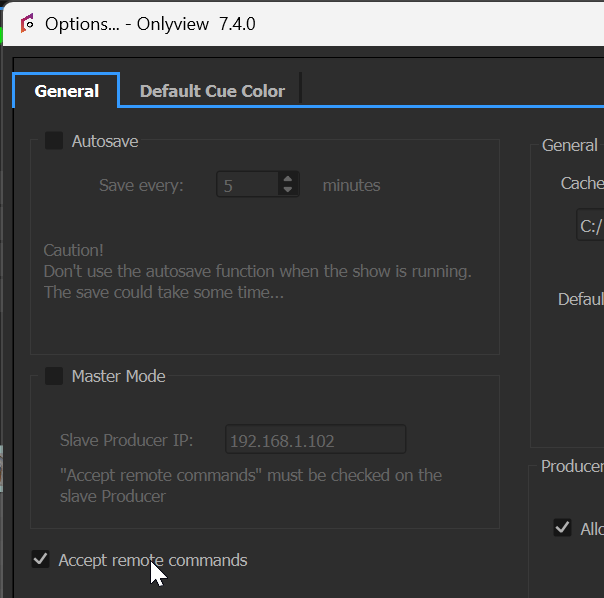
"Accept remote commands" must be checked in Producer options (File -> Producer options).
In the content tab, the status icon will turn green when the control software connects, and red when the connection is lost.

It is also possible to directly control a Media Server, if it acts as a Producer (Cluster Master or Solo; see the "Standalone Media Servers" section). In this case, only the following actions are executed: Pause, Loop, Timeline Actions (except lock / unlock timecode), Screen Action. Other actions are ignored.
Network protocol
Producer listens for TCP/IP connections on port 3055.
-
Command are utf-8 encoded
-
Commands are terminated by a 0x0A character ('\n')
-
Arguments are separated by "*"
loadshow*path_to_olv [M]
Loads a show.
Ex: loadshow*c:\\test.olv
Does not automatically put all the Media Servers online.
play*timelineID*timecode [M][S][C]
Plays a specific timeline at the given timecode. If the timecode is omitted, the timeline continues from its current position. The timecode is either expressed in milliseconds, or in HH:MM:SS:mmm format, with mmm in milliseconds.
Ex: play*1*1000 plays timeline 1 at 1 second.
locate*timelineID*timecode [M][S][C]
Locates a timeline at the given timecode, and pauses it.
setgrandmaster*timelineID*position*fadetime [M][S][C]
Executes a fading of a timeline's GrandMaster.
position: Between 0 (black) and 100 (full).
fadetime: transition time in milliseconds.
Ex: setgrandmaster*3*100*4000 : timeline 3 fades in, in 4 seconds.
settimelineon*timelineID*on [M][S][C]
Turns a timeline on or off.
on: 0 for off, 1 for on.
resetblind*timelineID [M][S][C]
Resets all the layers' blinds on a timeline
setlayerblind*timelineID*type*layerID*state [M][S][C]
Blinds or unblinds a layer.
type: 0 for command layers, 2 for media layers.
state: 1 for blind, 0 for normal
resetsolo*timelineID [M][S][C]
Removes all the solo flags on the layers of a timeline
setlayersolo*timelineID*type*layerID*state [M][S][C]
Sets a layer in solo mode.
type: 0 for command layers, 2 for media layers.
state: 1 for solo, 0 for normal
launchquickkey*quickkeyID [M]
Executes a quickkey
online [M]
Producer only. Puts all the Media Servers Online.
offline [M]
Producer only. Disconnects from all the Media Servers
shutdownmaster [M]
Producer only. Turns off the computer.
rebootmaster [M]
Producer only. Reboots the computer.
statetimeline*timelineID [M][S][C]
Returns the state of a timeline.
Ex: statetimeline*4 will send back statetimeline*4*[on]*[timecode]*[gm]
on: 0 for off, 1 for on
timecode: the timecode in milliseconds
gm: the grandmaster between 0 and 100.
positiontimeline*timelineID [M][S][C]
Returns the timecode of a timeline.
Ex: positiontimeline*4 will send back positiontimeline*4*[timecode]
timecode: the timecode in milliseconds
screenstatus*displayID [M][S][C]
Returns the status of a Media Server
Ex: screenstatus*4 will send back the state of Media Server #4 : screenstatus*4*[state]
state: 0 if never connected yet; 1 if disconnected; 2 if connection in progress; 3 if connected; 4 if error.
shutdownscreen*displayID [M][S][C]
Turns off a computer.
rebootscreen*displayID [M][S][C]
Reboots a computer.
wolscreen*displayID [M][S][C]
Sends a Wake On LAN to a computer.
The WOL feature must be enabled in the BIOS, and the master must know the MAC address of the target Media Server. The normal way for this, is to make a normal Ctrl-O once during the installation.
displaytestpattern*num [M][S][C]
Shows a test pattern
Id=0 : None
Id=1 : Small Test Pattern
Id=2 : Horizontal Black Level
Id=3 : Vertical Black Level
Id=4 : Chessboard
Id=5 : Onlyview Logo
Id=6 : SMPTE SD ColorBar
Id=7 : SMPTE HD ColorBar
Id=8 : OSD