Loop & Freerun
Loop & freerun
The Loop option makes the media go back at the start when reaching the end.
This is not useful in itself, because reaching the end of the media means that we will leave the cue:
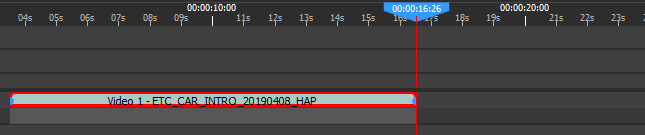
However, the cue can be extended to be longer than the media:
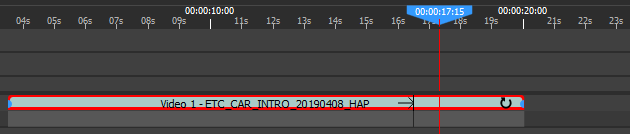
A black vertical mark will show when the media wraps around.
-
If the cue is not in loop mode (the default), the last frame of the media will be kept. A looping cue will have a small loop indicator on the right
-
If the cue is in loop mode, the media will wrap.
Looping takes in/out into account: if you crop 1 second of a 10-second movie, then the media will loop every 9 seconds.
Freerun makes the cue handle time by itself. As soon as the cue starts playing, the cue will entirely ignore the container's timecode. In particular, this means that pausing the timeline or board will not impact freerun cues, which will continue playing:
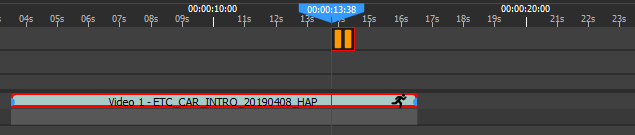
Freerun is often used in conjunction with Loop; otherwise, the freerun cue will continue playing the last frame of the media.
The only way to stop showing the cue is to move the locator outside of the cue. This will also reinitialize the internal timecode, so exiting and re-entering the cue starts playing the media at the expected timecode.
Ping-pong
Ping-pong is a variant of Loop. Instead of jumping straight back to the start when reaching the end -- which produces the visible discontinuity marked by the black bar above -- the media plays backwards until it reaches the start, then forwards again, and so on. This gives a continuous back-and-forth motion, and avoids the seam of a plain loop, which is handy for content that was not authored as a perfect loop.
Like Loop, ping-pong only has a visible effect when the cue is extended beyond the media duration (or when the cue is in freerun mode), and it takes in/out into account. Because it relies on backward playback, ping-pong is only available on intermediate codecs : HAP, NotchLC, ProRes... ( not h.264 or similar).
Self-crossfade
Self-crossfade is another way to hide the wrap of a looping cue. Rather than cutting abruptly from the last frame back to the first, the end of the media is progressively blended into its beginning, producing a seamless loop. This is especially useful for backgrounds that do not loop cleanly on their own.
Self-crossfade is used together with Loop and, like it, only matters when the cue is longer than the media (or when the cue is in freerun mode). During the blend, the end and the start of the media are shown on top of each other, so a media that ends and starts on very different images will briefly show both.