Audio
Onlyview usage
Onlyview accepts the following audio formats: wav, aif, aiff, flac, mp3, ogg. Audio streams inside a movie container are also supported (see below).
An audio media is added to the media list like any other media (drag & drop, or the Add Media button), and dragged onto a timeline to create an audio cue. The cue's volume is set with its Fade parameter, and can be animated like any other cue parameter.
Everything about audio output — enabling audio on a Media Server, choosing the device and sample rate (ASIO / WASAPI / MME / DirectSound / ALSA), the show's virtual channels, patching cues to them, and the monitoring window with its VU meters — is documented in Audio outputs. That page is the reference for how the sound actually gets out of the servers; this page only covers the media side.
If the input file does not have the same sample rate as the output card, it will be automatically resampled so that it plays correctly, at the expected speed and pitch.
Audio streams inside a movie container
When importing a movie container (MP4, MKV, ...), all audio streams will also be listed in the media list, as submedias of the container:

Dragging the container in the timeline will create multiple cues, one for each stream. This allows for fine synchronization between audio and video.
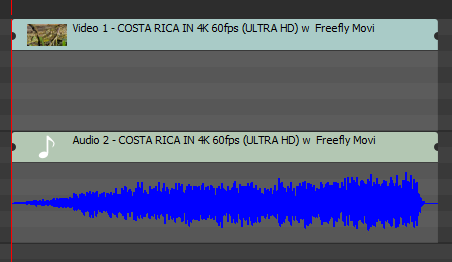
Each stream can also be dragged on its own, if you only need the video or only the sound.