DMX Recording
Onlyview usage
Onlyview can record a live DMX lighting show — typically the output of a lighting
console such as a grandMA — into an .ovdmx file, and later replay it as a media,
in sync with the rest of the show. Onlyview then re-emits the DMX in place of the
console.
Both Art-Net and sACN are supported. (This is unrelated to Pixel Mapping.)
An .ovdmx file stores, along the recording timeline, the value of every channel on
each monitored universe, plus the protocol used (Art-Net or sACN), the recorded
universes and the net/sub-net.
Recording a show
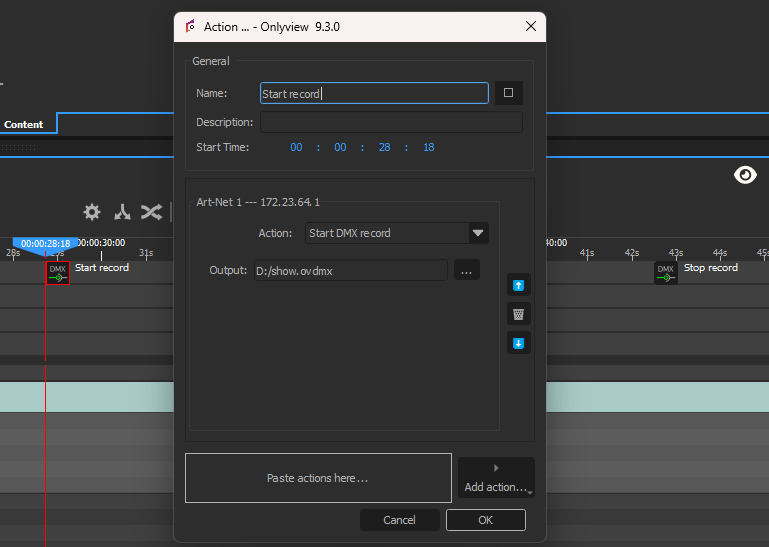
Recording is driven by two Command Cues, placed on a timeline command-cue layer. They are the entry points of the whole feature.
Prerequisite — an Art-Net or sACN device, configured to receive the universes coming from the console (the correct net/sub-net and monitored universes).
- Add a Command Cue where the recording should start, and set its device action to
Start DMX record. Choose the output
.ovdmxfile path. - Add a later Command Cue with the action Stop DMX record.
- Start the show and let the console output its DMX. Onlyview captures the incoming stream between the two cues into the file.
If the chosen device is also set as an emitter, its emission is paused for the duration of the recording (a warning is shown in the action editor).
Playing it back
- Import the recorded
.ovdmxinto the media list (drag & drop, or the Add Media button). The media has no setup dialog; its universes, net/sub-net and protocol are read from the file and shown as media information. Its duration matches the recording. - Drag the media onto a timeline to create a cue.
- Double-click the cue and select its output device — the Art-Net or sACN device that should re-emit the DMX (usually the same one used for the recording).
- Remove the Start/Stop record Command Cues (or disable their layer) so the show does not record over the file the next time it plays.
When the locator plays over the cue, Onlyview sends the recorded DMX values through the selected device, in sync with the timeline — replacing the console. Scrubbing and seeking on the timeline are supported: Onlyview looks back over the last couple of seconds to recover the last known channel values (a console may wait over a second between packets when nothing changes).
Notes
- The cue must be routed to a device of the same protocol as the recording: an Art-Net recording replays through an Art-Net device, an sACN recording through an sACN device.
- sACN works exactly like Art-Net throughout; simply pick an sACN device when recording and when selecting the cue's output device.
- For network configuration of the device (interface, net/sub-net, monitored universes, emission), see the Art-Net device or sACN device page.