Subtitles
Onlyview usage
Onlyview can play subtitles as a media, rendered as text on a transparent background. The text is drawn into its own texture, so a subtitle media behaves like any other media: place it in a cue, position and deform it in the 2D preview, capture it in a TextureArea, send it to any Display.
Supported sources
Subtitles come from two kinds of sources:
- Standalone subtitle files: drag & drop a
.srtfile into the media list. It is added as a subtitle media with a default size of 1920 × 1080. - Subtitle streams embedded in a movie container (e.g. a
.mkv/.movthat carries one or more subtitle tracks). The file is added as a container media, and each subtitle track appears as a submedia alongside the video and audio streams. Embedded subtitles inherit the size and duration of the video stream that precedes them, so they line up naturally when looping.
Internally, subtitles are decoded with FFmpeg and converted to the ASS format, whatever the original source was.
Media List
Add a subtitle the same way as any media (drag & drop, or the Add Media button). Open the setup dialog from the media setup button to configure it.
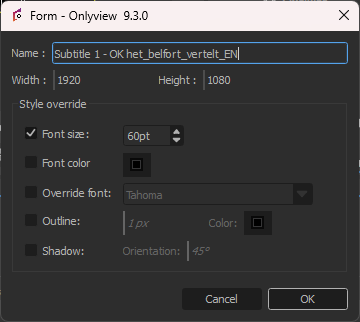
Name: The submedia name shown in the media list.
Width / Height: The size, in pixels, of the texture the text is rendered into. This is the default cue size and defines the box in which the subtitle is laid out. Text is anchored to the bottom-center of this box and wraps to the box width, so make the box as large as the area over which subtitles should be able to appear.
Style override
By default, the text uses the style defined in the subtitle track (font, size, bold/italic/underline), and is drawn in white. Each field in the Style override group has its own checkbox: tick it to replace the corresponding default with your own value, leave it unticked to keep the source style.
Font size: Overrides the font size, in points.
Font color: Overrides the text color.
Override font: Overrides the font family. The bold, italic and underline attributes from the source style are still applied.
Shadow: Draws a drop shadow behind the text — a semi-transparent copy of the text, offset by a few pixels. Orientation is the angle (in degrees) of the shadow offset: 0° pushes the shadow to the right, 90° downward, and so on.
Outline: Draws an outline around the glyphs. Set the outline width (in pixels) and its color. Combine it with a contrasting font color to keep subtitles legible over bright or busy content.
Style settings are saved with the show. When a subtitle media's file is replaced, the style override is kept.
Playback
A subtitle media follows the time of its cue: as the timeline locator moves over the cue, the corresponding subtitle line appears and disappears at the times defined in the source. Inline ASS formatting tags are ignored; explicit line breaks in the source are respected.
Limitations
- Inline per-line formatting (colors, positions, karaoke, etc. encoded as ASS
{...}tags) is stripped; only the plain text is shown, using the media's style. - Text is always anchored to the bottom-center of the media box.