Notch
Onlyview usage
Onlyview can play a Notch block (.dfxdll file) as generative real-time content.
A Notch block is a self-contained effect exported from Notch Builder; Onlyview
renders it live and lets you drive its exposed parameters from the show.
A Notch playback license (on a CodeMeter dongle) is required on Producer and on every Media Server. Notch media is Windows-only and will not render on Linux Media Servers.
Licensing
You need a dedicated Notch playback license to play the content in Onlyview.
Producer needs one to be able to open the .dfxdll and list its parameters
(and optionally, render it in the preview). It can be a watermarked license.
Each MediaServer also needs its own playback license - the license depends on the resolution (above 4K, you need the Unlimited license). Unlike Onlyview, which uses a single CodeMeter dongle on Producer, Notch needs a dongle on each server.
Media List
To add a Notch media, drag & drop a .dfxdll file into the media list, or use the
Add Media button. The setup dialog opens on first add, and can be reopened later via
the media setup button.
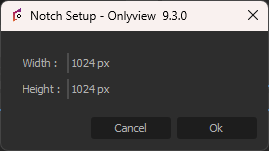
Width / Height: The size, in pixels, of the output texture the block is rendered into (16-16384). Choose the resolution the effect was authored for; it is independent of the cue's on-stage size, which can be scaled and deformed like any other media.
Notes and limitations
- Loading a block is slow - up to about a minute for heavy blocks. An initial delay when the cue first plays is expected.
- The block's exposed parameters are read from the file and cached, so the first time you configure them (in the ActionGraph) there may be a short pause.
- As with all generative content played across several Media Servers, the block must behave deterministically to stay in sync. Particle systems and other time- or randomness-dependent effects are the usual source of desync.
ActionGraph
Most interaction with a Notch media is done through the ActionGraph: the exposed parameters of the block are driven by the Notch node (and its companion Pos + Rot and Notch Camera nodes). Exposed Texture parameters can even be fed from a TextureArea, so Onlyview content can be composited inside the Notch block.
For the node inputs, events and details, see the Notch node in the ActionGraph nodes reference. As with the TouchEngine node, the node's Update event input must be connected to an OnFrame event so that parameters are sent every frame.