Spout
Onlyview usage
A Spout receiver can share a GPU buffer with a separate Spout-enabled application, for instance Unreal Engine or Unity3D.
This makes it possible to add real-time generative content into Onlyview.
Note that the 3^rd^-party application must run on all Media Servers at the same time. As such, they need to provide deterministic behavior. In particular, particles are often problematic.
Media List
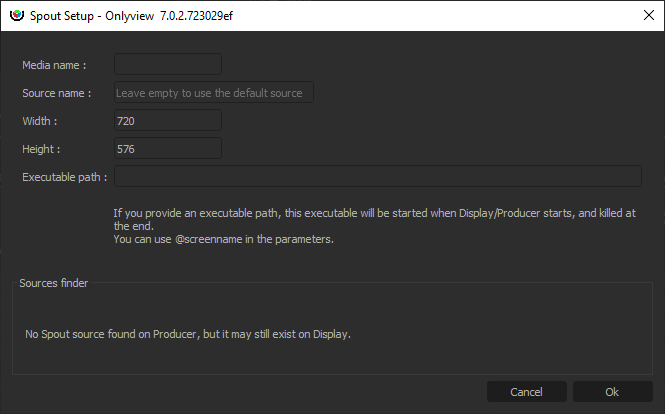
Media name: A name that is meaningful to you
Source name: Each Spout sender identifies itself by its name. There are several options:
-
If you know the name, just enter it.
-
You can run the sender on Producer; the source will then appear in the Sources finder.
-
If there is only 1 source, you can leave the field empty, and Spout will auto-select the first source.
Width/Height: The size of the cue. Does not need to match the stream resolution.
Executable path: The content is provided by a separate executable. You can start and stop it manually, but this is cumbersome, because this needs to be done on all Media Servers, which are usually not easily accessible.
Instead, Onlyview can start and stop if for you: If you enter D:/path/to/my/content.exe, each Media Server will start the application at Ctrl-O. This is still problematic because you have to copy content.exe on all Media Servers; so an easier way is to use a shared folder, for instance \\creative-pc\share\content.exe
You can also pass command-line arguments to the executable, like --no-fullscreen or --currentscreen=\@screenname , so that you can add extra logic in your application depending on which Media Server it is running on.
See also
Onlyview can also send a Spout texture to a third-party application — see Spout output.